The master sheet
One spreadsheet with twelve tabs, a four-color legend, and a version called final_v7_REAL_final.xlsx.
Teachers, groups, rooms and rules: a real constraint solver computes your timetable locally.
You describe your school. Your agent sets it up. Kaselles computes.
Tell your agent which groups, teachers and rules your school has. It sets them up in Kaselles; the engine searches for a valid timetable.
 Claude
 ChatGPT
 Gemini
 Cursor
 OpenCode
Local MCP connection. If you use an AI agent, its provider may process the data it reads.
One spreadsheet with twelve tabs, a four-color legend, and a version called final_v7_REAL_final.xlsx.
A teacher messages you: “I forgot to mention I can't do Tuesdays.” And just like that, half your grid moves.
Two groups booked into the same room at the same hour. You find out when someone shows you the printout.
Pasting cells, undoing, pasting again… until you square it by eye and cross your fingers.
It's not a lack of method. It's that you're solving by hand a problem designed so that no person could solve it by hand.
A school timetable is an equation with thousands of variables.
You don't square it. You compute it.
Inside Kaselles runs a constraint optimization engine — the kind of technology behind logistics and industry — hidden inside a simple app. You set the rules; the engine explores millions of combinations and returns a valid timetable. Or it tells you, point by point, why one doesn't exist yet.
The engine guarantees the hard rules: nobody in two places at once, no double-booked room, every teaching hour covered. The impossible is ruled out by construction.
No generic errors: Kaselles points to the exact clashes and takes you to the setting, so you decide what gives.
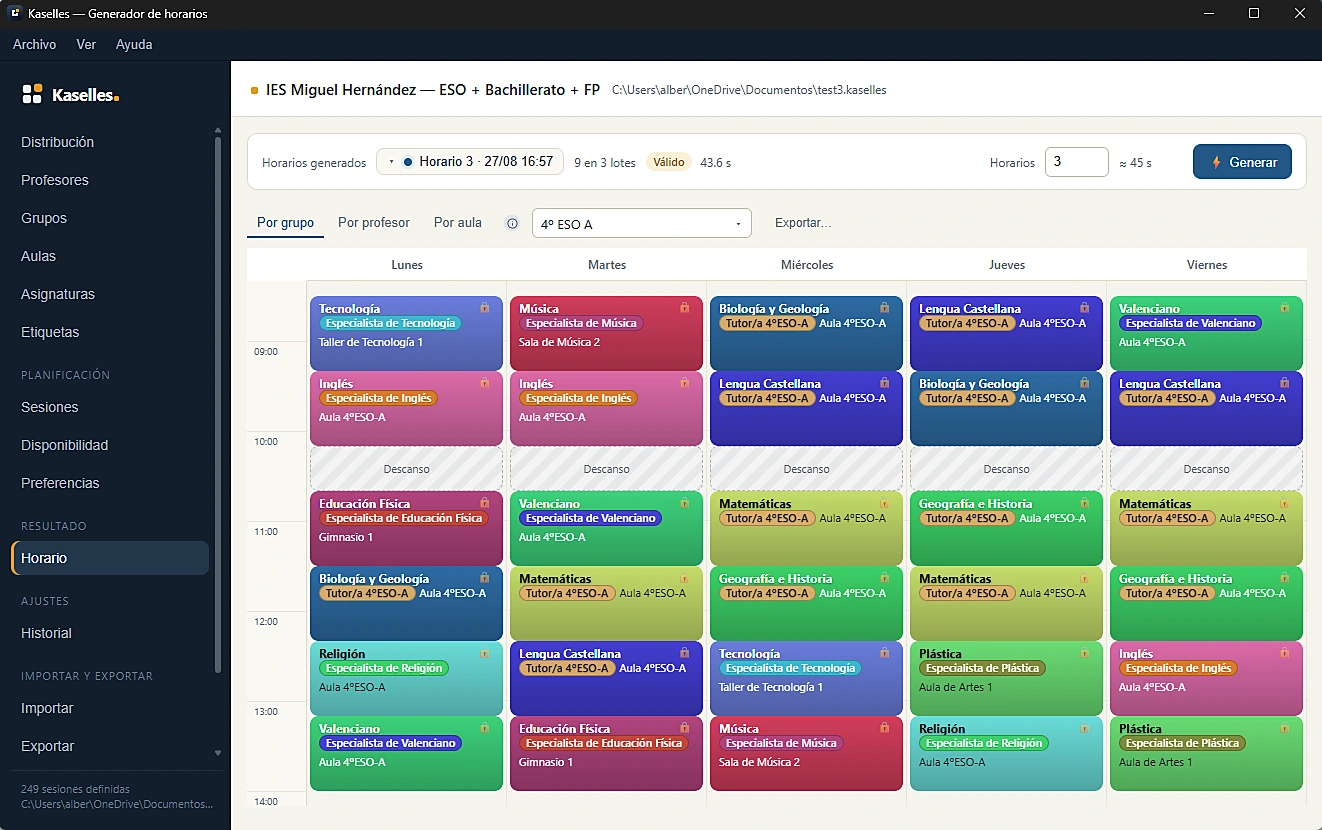
Did Wednesday come out perfect? Lock it. Regenerate, and Kaselles respects what's fixed and re-solves only the rest.
Import from Excel, CSV, ITACA and Untis, with a free downloadable template and automatic format detection.
Export by group, teacher or room as PDF, Excel or image. Clean, readable, ready to print or share.
Double and triple periods, split groups and synced electives, specialised rooms, co-teaching and in-class support: real constraints, not workarounds.
No two-day training. No 80-page manual.
Import from Excel, CSV, ITACA or Untis — the assistant detects the format — or create everything by hand. Teachers, groups, rooms and subjects, ready.
Availabilities, double periods, equipped rooms, co-teaching, “this group can't start at eight”. Checkboxes, not code.
A valid timetable in seconds. Lock what convinces you, re-solve the rest, and get the PDF by group, teacher or room.
No crippled basic plan, no showcase features behind a wall. There's a single line between the plans: how many teachers you assign when you generate.
One single thing changes: you generate with unlimited teachers.
100 € a year, once. Less than one afternoon spent squaring it by hand in September.
Software is. Your data stays with you.
Projects and computation are local. If you connect an AI agent, its provider may process the data the agent reads. Check its terms and share only what is needed. You can also work without AI.
AI control is implemented through a local MCP connection. Real-client compatibility and proxy packaging still need verification. A sample configuration does not guarantee that ChatGPT, Claude or another client can connect; a cloud service cannot directly reach your computer.
Generation and editing run fully offline, anytime.
Open local files: if you leave tomorrow, you take everything with you.
There is none: importing, exporting, editing and regenerating are free on every plan. Only one thing is paid — generating with more than 5 assigned teachers — and it's paid once a year.
The distinct teachers who appear in the project's sessions (lead teachers and support), not the profiles created. You can register 50 teachers with only 5 carrying teaching load — and still generate for free.
Yes, and properly: create or import the whole centre and configure all your rules before paying anything. When you press Generate, Kaselles will offer to activate Pro. Your work stays saved — paying starts nothing from scratch.
Projects and computation are local. If you connect an AI agent, its provider may process the data the agent reads. Check its terms and share only what is needed. You can also work without AI.
Check the visible changes in the app. The agent configures data and rules; the OR-Tools CP-SAT engine searches for a timetable that meets them. You review the result before sharing it. AI control is implemented through a local MCP connection. Real-client compatibility and proxy packaging still need verification. A sample configuration does not guarantee that ChatGPT, Claude or another client can connect; a cloud service cannot directly reach your computer.
It tells you: Kaselles shows which restrictions clash and takes you to the related setting so you decide what to give up. Never a bare “error”.
No. It's a desktop application: generation, editing and export run fully offline. With connection, the licence renews itself; without it, it holds for 30 days.
Up to 3 per subscription, manageable at any time from your account.
Cancel whenever you like and keep access until the end of the paid year. Your timetables are local files that belong to you: they stay with you whatever happens.
Use conversation to prepare your school, not to assume a table is valid. Kaselles separates the agent's work from timetable computation.
A secondary school, a language academy and a vocational centre do not share the same teaching week. Model the real organisation before placing lessons.
A timetable is only as sound as its input data. These checks help avoid searching for hours under contradictory conditions.
There is no need to replace a method that works. A change makes sense when checking every adjustment costs more effort than maintaining structured school data.
Importing a spreadsheet and connecting an agent are different operations. In either case, checking the resulting data remains your responsibility.
This distinction determines whether a solver can trade off an improvement or must reject a timetable. Agree on it before entering rules.
Download Kaselles, bring your centre in, and have a conflict-free timetable today.